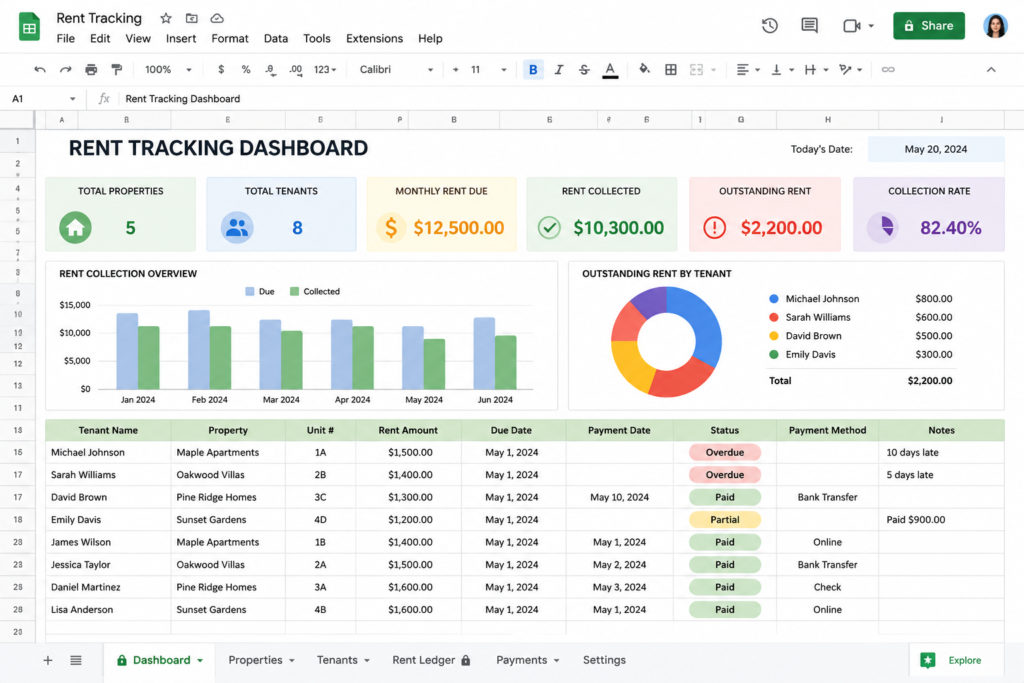
Managing rent payments when you’ve got one to four units isn’t complicated — but it is easy to let things slip. A missed follow-up on a late payment, a cash payment you forgot to log, a tax season scramble because you never wrote anything down. These are real problems that cost landlords time and money.
A rent tracking spreadsheet solves most of this with zero cost and almost no setup. You don’t need property management software. You don’t need to pay for an app. A simple spreadsheet — whether in Google Sheets or Excel — will do the job just fine for the vast majority of small landlords.
This post walks you through exactly what to put in your spreadsheet, gives you a free template you can copy right now, and shows you how to pair the spreadsheet with a rent receipt generator so your records are complete on both ends.
This article is for informational purposes only and does not constitute legal or tax advice. Laws vary by state. Consult a qualified attorney or tax professional for advice specific to your situation.
Why Small Landlords Need a Rent Tracking System
If you’re self-managing one or two units, you might think you can keep rent payments straight in your head or check your bank statements when needed. That works — until it doesn’t.
Here’s when it breaks down:
- A tenant pays cash. You don’t write it down. Three weeks later there’s a dispute.
- You try to file Schedule E and can’t remember if the tenant in Unit 2 paid October or not.
- A tenant claims they’ve never missed a payment. You have no log to reference.
A simple spreadsheet eliminates all of these scenarios. You have a running record of every payment — who paid, how much, when, and by what method. That log becomes your first line of defense in any dispute, and it’s exactly what your accountant needs at tax time.
The IRS Publication 527 (Residential Rental Property) recommends that landlords keep thorough records of all rental income received, including dates and amounts. A spreadsheet handles this automatically as long as you update it consistently.
What to Include in a Rent Tracking Spreadsheet
A good rent tracking spreadsheet doesn’t need to be complex. The core columns are:
| Column | What to Track |
|---|---|
| Tenant Name | Full name of the tenant |
| Unit / Property | Unit number or address |
| Rent Due Date | The date rent is contractually due |
| Amount Due | Monthly rent amount per lease |
| Date Paid | The actual date payment was received |
| Amount Paid | What was actually paid (may differ if partial) |
| Payment Method | Cash, check, Venmo, Zelle, bank transfer, etc. |
| Receipt Issued? | Yes/No — did you generate a receipt? |
| Notes | Late fees, partial payments, disputes, etc. |
A few columns worth highlighting:
“Amount Paid” vs. “Amount Due”: Keeping these separate lets you instantly see shortfalls without digging through notes.
“Receipt Issued?”: This column matters. It closes the loop between tracking and documentation. If the column says “No,” that’s your reminder to generate a free rent receipt at FreeRentReceipt.com.
“Payment Method”: Cash payments especially need documentation. If you don’t have a log and a receipt, you have nothing.
Free Rent Tracking Spreadsheet Template (Copy or Download)
You don’t need to build this from scratch. Here’s how to get a working template in about 60 seconds:
Option 1 — Google Sheets (Recommended)
- Open Google Sheets at sheets.google.com
- Click Blank spreadsheet
- Add these column headers in Row 1: Tenant Name | Unit | Rent Due Date | Amount Due | Date Paid | Amount Paid | Payment Method | Receipt Issued? | Notes
- Freeze Row 1 (View → Freeze → 1 row) so the headers stay visible as you scroll
- Color the “Receipt Issued?” column light red so unpaid receipts stand out
- Add a new row for each payment as it comes in
Option 2 — Microsoft Excel Same setup, same column headers. Save the file to a cloud folder (OneDrive or Google Drive) so it’s accessible from your phone if you’re at the property.
Option 3 — Download a Pre-Made Template If you’d rather not build from scratch, search for “rent payment tracker Google Sheets template” — there are free versions on Vertex42 and similar sites that you can copy into your own Drive account.
For most landlords with 1–4 units, a basic setup takes under five minutes and covers everything you need.
How to Use the Spreadsheet: Step-by-Step
Step 1: Set it up before the first of the month. Enter each tenant’s name, unit, and expected rent amount at the start. Don’t wait until payments come in — setting up the row in advance means you’ll notice immediately if a due date passes without a payment.
Step 2: Log every payment the day it arrives. Whether it’s cash, a check, or a Venmo notification at 9pm — log it the same day. Enter the date, the amount, and the payment method. The longer you wait, the more likely you are to forget a detail.
Step 3: Flag late payments in the Notes column. If a payment arrives after the grace period, note it. If you charged a late fee, note the amount and whether it was collected. This is the paper trail you need if a dispute escalates.
Step 4: Check the “Receipt Issued?” column. Once the payment is logged and a receipt is issued, mark that column “Yes.” If it says “No,” generate the receipt before the end of the day. More on this in the next section.
Step 5: Review the spreadsheet at month’s end. Before each new month, scan the prior month’s entries. Every “Amount Due” should have a matching “Amount Paid.” Every row should show “Yes” in the receipt column. If something’s missing, fix it now rather than in April.
For deeper guidance on landlord record-keeping practices, see landlord record keeping best practices at FreeRentReceipt.com.
From Tracking to Documentation: Why a Rent Receipt Matters
Logging a payment in your spreadsheet tells you what happened. A rent receipt proves it to everyone else — the tenant, a judge, the IRS, or a prospective tenant checking your track record.
The spreadsheet is your internal record. The receipt is the external documentation. You need both.
A proper receipt includes the tenant name, property address, amount paid, payment date, payment method, and the period covered. It should be signed or timestamped. Understanding what is a rent receipt — and how it differs from a lease or a bank statement — is important before you decide what counts as “documentation.”
Some states actually require landlords to provide receipts for cash payments. Even where it isn’t legally required, it’s good practice. It eliminates disputes before they start.
Once you’ve logged the payment in your spreadsheet, issue a rent receipt in seconds at FreeRentReceipt.com. The generator is free, takes under a minute, and produces a professional PDF you can email directly to your tenant.
Rent Tracking Software vs. a Simple Spreadsheet: Which Is Right for You?
There’s a whole category of property management software out there — Buildium, TurboTenant, Avail, RentRedi, and others. These tools can handle online rent collection, maintenance requests, lease storage, and applicant screening all in one platform.
For a landlord with 10+ units, that kind of system makes sense. You’re running a small business and you need centralized tools.
For a landlord with 1–4 units? The math is different. Most property management platforms charge monthly fees that quickly add up to hundreds of dollars per year. The features you’d actually use — tracking payments, issuing receipts, storing records — are all things you can do with a spreadsheet and a free receipt generator.
The one thing software does that a spreadsheet doesn’t: automatic reminders and online rent collection. If your tenants are consistently late and you want automated nudges, a lightweight tool like TurboTenant’s free tier may be worth exploring.
But if your tenants pay on time and you’re mainly looking to stay organized and document payments, a spreadsheet plus the free receipt generator at FreeRentReceipt.com does the job without the monthly bill.
If you’re weighing your options, FreeRentReceipt.com’s Excel alternative page shows exactly what the receipt generator can and can’t do compared to spreadsheet-only tracking.
How to Provide a Rent Statement to Your Tenant
A rent statement is a summary document — usually covering multiple months — that shows a tenant’s payment history. It’s different from a receipt (which documents a single transaction). Tenants often need a rent statement for rental applications, loan approvals, housing assistance programs, or legal proceedings.
As a landlord, you can generate a rent statement directly from your spreadsheet. Here’s a simple approach:
- Filter your spreadsheet to show only that tenant’s rows
- Export or copy the data to a clean sheet
- Add a header with the tenant name, address, and your contact information
- Label it “Tenant Rent Payment Statement” with the date range covered
- Include the total amount paid over the period
You don’t need special software to produce this. A clean export from your tracking spreadsheet, formatted as a PDF, is sufficient for most purposes.
For individual payment documentation, a free rent receipt template is faster and already formatted correctly. For the rent receipt format that landlords are expected to follow — and what’s legally required in various states — that guide covers the standards in plain English.
If a tenant needs formal proof of rent payment for a specific purpose — like a housing assistance application or a Section 8 verification — a letter-format document may be more appropriate than a spreadsheet export. That post covers exactly when each format is needed.
For more rental management advice, browse our Landlord Tips category. For receipt templates, documentation help, and proof-of-payment guidance, explore our Rent Receipts category.
Your spreadsheet handles the tracking. The free rent receipt generator at FreeRentReceipt.com handles the documentation. Together, you’ve got a complete system for managing rent payments without paying for software you don’t need. Generate your free rent receipt at FreeRentReceipt.com — it takes under a minute.
Frequently Asked Questions
How do I keep track of rent payments from multiple tenants? A spreadsheet with one row per payment is the simplest approach. Include columns for tenant name, unit, due date, amount due, amount paid, date paid, and payment method. Review it at the start of each month to catch any gaps. If you have more than four or five units, consider property management software with built-in rent tracking.
What should a rent tracking spreadsheet include? At minimum: tenant name, property or unit, rent due date, amount due, date paid, amount actually paid, and payment method. Adding a “Receipt Issued?” column keeps your documentation in sync with your payment log and makes it easy to spot months where you forgot to send a receipt.
Can I use Excel or Google Sheets to track rent? Yes — both work well. Google Sheets has a slight edge for small landlords because it’s free, lives in the cloud, and is accessible from any device. Excel works great if you already have Microsoft Office and prefer a desktop app. The column structure and workflow are identical either way.
What is a rent statement from a landlord? A rent statement is a summary of a tenant’s payment history over a defined period — usually three to twelve months. It’s different from a single rent receipt. Tenants typically need a rent statement when applying for a new rental, applying for a mortgage, or accessing housing assistance programs. You can generate one directly from your tracking spreadsheet by filtering and exporting the relevant rows.
Do landlords have to provide rent statements? There’s no universal requirement, but many state landlord-tenant laws require landlords to provide rent receipts for cash payments, and some require a payment history upon tenant request. Even where it’s not legally required, providing a statement when a tenant asks is good practice. Check your state’s landlord-tenant statutes or consult Nolo’s landlord-tenant law overview for state-specific guidance.
What’s the difference between a rent receipt and a rent statement? A rent receipt documents one specific payment — the date, amount, method, and period it covers. A rent statement summarizes multiple payments over time. Landlords should issue receipts after each payment and be able to produce a statement (from their tracking spreadsheet) when a tenant needs a payment history.
